
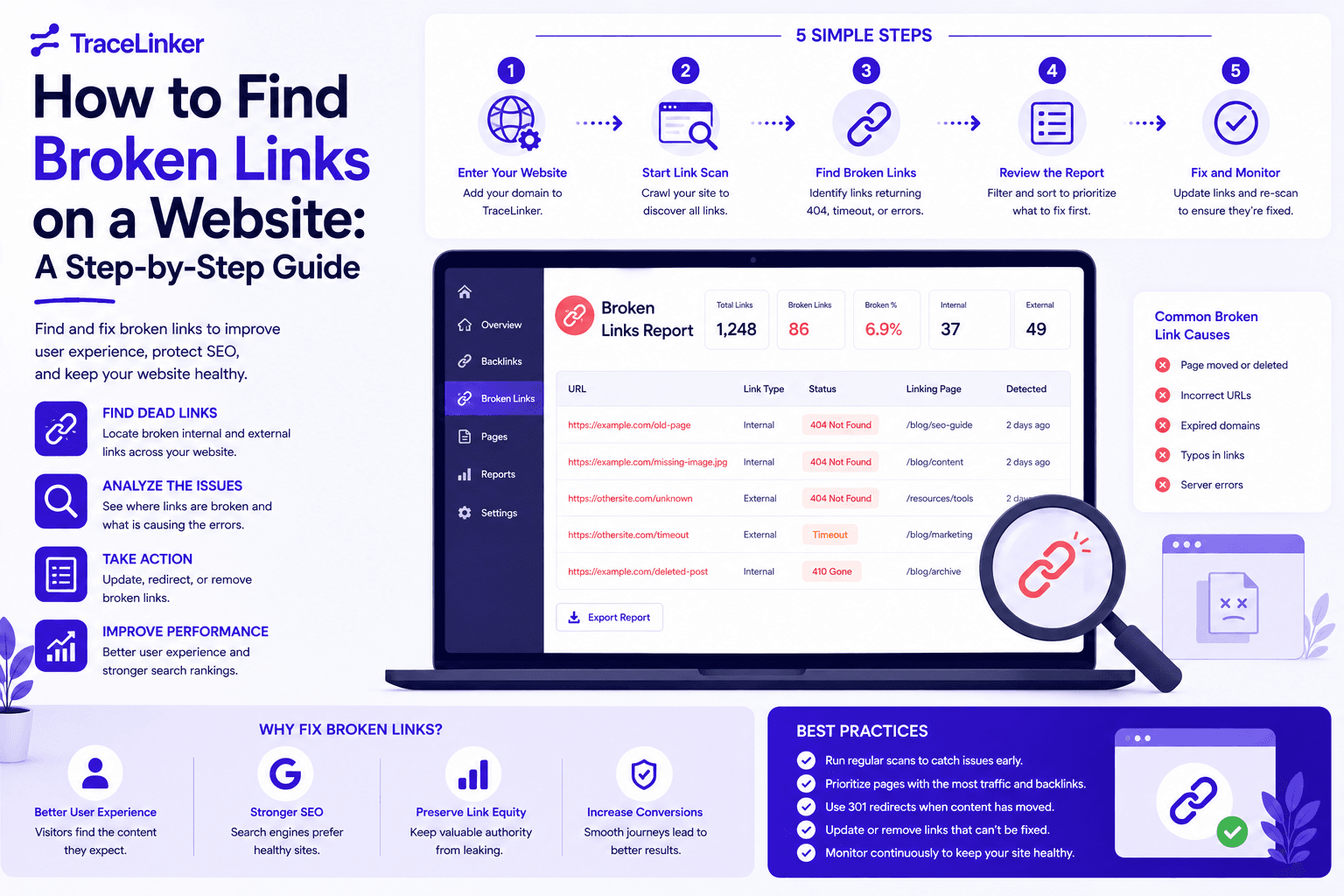


How to Find Broken Links on a Website: A Step-by-Step Guide
Broken links are a common problem for every website. Pages move, URLs change, external sites shut down, and content management systems generate links that eventually stop working. Over time, these dead links create a poor user experience and send negative signals to search engines.
Finding broken links is not difficult, but it does require a systematic approach. In this guide, we show you how to find broken links on a website, what tools to use, and how to fix them. We also cover how broken link discovery can become a link-building opportunity.
Why Broken Links Matter
A broken link is a hyperlink that points to a page or resource that no longer exists. The most common result is a 404 error, but broken links can also return other error codes like 410, 500, or connection timeouts.
Broken links matter for three reasons.
User Experience
Visitors expect links to work. When they click a link and land on an error page, they lose trust in the site. This is especially damaging on conversion pages, help centers, and resource lists.
SEO and Crawl Budget
Search engines use links to discover and index pages. When crawlers repeatedly hit dead links, they waste crawl budget and may not reach your important pages. A high number of broken links can also signal that a site is poorly maintained.
Lost Authority and Traffic
Internal broken links waste link equity. If a high-authority page links to a deleted page, the value of that link is lost. Outbound broken links also hurt your credibility, especially if you link to sources that no longer exist.
Step 1: Define Your Scope
Before you start, decide what you want to check. Your scope determines the tools and methods you use.
- Single page: Useful for auditing a specific blog post, landing page, or resource list.
- Entire website: The best option for regular site maintenance and SEO audits.
- Outbound links only: Helpful for checking links to external sources, references, and partners.
- Internal links only: Useful for finding navigation issues, redirects, and orphaned pages.
For a complete audit, check both internal and external links across the entire site. If you only have a few minutes, start with your most important pages.
Step 2: Use a Free Online Broken Link Checker
Free online tools are the fastest way to find broken links without installing anything. They are ideal for small websites, one-off checks, and quick audits.
How They Work
Most free broken link checkers ask for a starting URL, then crawl the site and report any links that return error codes. They typically check:
- Internal links
- Outbound links
- Links to images, stylesheets, and other resources
- HTTP status codes
Popular Free Tools
- Dead Link Checker: Crawls a single page or an entire website and reports broken links. It also offers paid multi-site and automatic checks.
- Dr. Link Check: Crawls the site and checks links for broken URLs, invalid SSL certificates, blacklisted domains, and soft errors.
- Broken Link Check: Checks websites and blogs for dead links, shows the location of bad links in the HTML, and reports HTTP error codes.
To use one of these tools, enter your homepage URL, wait for the crawl to complete, and review the report. Most tools show the broken URL, the page it appears on, and the HTTP status code.
Step 3: Use a Browser Extension
Browser extensions are useful for checking links on the page you are currently viewing. They do not crawl the entire site, but they are great for quick spot-checks during content reviews.
How to Use a Browser Extension
- Install a broken link checker extension for your browser.
- Navigate to the page you want to check.
- Click the extension icon.
- Review the list of broken links on that page.
Extensions are helpful when you are editing a page and want to verify that all links work before publishing. They are also useful for checking competitor pages during broken link building outreach.
Step 4: Use a Site Crawler or SEO Tool
For larger websites and ongoing monitoring, a dedicated SEO crawler is the best choice. These tools offer deeper analysis, scheduling, and integration with other SEO workflows.
What a Site Crawler Can Do
- Crawl thousands of pages automatically.
- Identify broken internal links, external links, and resource links.
- Report redirect chains, soft 404s, and server errors.
- Export results to CSV for further analysis.
- Schedule regular audits.
Common SEO Tools for Broken Link Checking
- Screaming Frog: A desktop crawler that checks up to 500 URLs for free and unlimited URLs with a paid license.
- Sitebulb: A visual crawler with detailed reports and recommendations.
- Ahrefs Site Audit: Cloud-based auditing with scheduled crawls and historical data.
- Semrush Site Audit: Includes broken link reports, internal link analysis, and technical SEO checks.
If you are serious about SEO, use one of these tools for your regular site audits. They are more reliable than free checkers for large or complex sites.
Step 5: Check Google Search Console
Google Search Console is a free and essential tool for any website owner. It shows you issues Google has already discovered, including crawl errors and pages that return 404 errors.
How to Find Broken Links in Google Search Console
- Open your property in Google Search Console.
- Go to the Indexing section and click Pages.
- Look for pages labeled "Not found (404)" or "Soft 404."
- Click into the report to see the affected URLs and where Google found them.
This report is valuable because it shows pages Google has already tried to crawl. Fixing these issues helps Google crawl your site more efficiently and can improve your visibility over time.
Step 6: Interpret the Results
Once you have a list of broken links, the next step is to understand what they mean. Not all broken links require the same response.
404 Not Found
The page or resource no longer exists. This is the most common broken link error. Decide whether to restore the page, redirect it, or remove the link.
410 Gone
The page has been permanently removed and will not return. This is more explicit than a 404. In most cases, you should remove or update the link.
500 Server Error
The target server is having problems. This may be temporary. Check again later, and if the issue persists, consider removing or replacing the link.
403 Forbidden
The target server is blocking access. This can happen with restricted pages, paywalls, or misconfigured security settings. If the resource is not publicly accessible, replace the link.
Soft 404
The server returns a 200 OK status, but the page content indicates the page is missing. Search engines may treat these as 404s. Fix these by returning a proper 404 or 410 status code, or redirect the page.
Redirect Chains
A redirect chain occurs when a link passes through multiple redirects before reaching the final page. This wastes crawl budget and slows down user experience. Update the link to point directly to the final URL.
Step 7: Fix or Redirect Broken Links
After identifying broken links, you need to fix them. The right fix depends on the situation.
Restore the Missing Page
If the page was accidentally deleted or moved without a redirect, restore it. This is the best option when the page still has traffic, backlinks, or search visibility.
Create a 301 Redirect
If the page has been permanently removed but has backlinks or traffic, redirect it to the most relevant existing page. This preserves link equity and sends users to a useful resource.
Update the Link
If the target page has moved to a new URL, update the link to point to the correct location. This is common for outbound links to pages that have changed their URL structure.
Remove the Link
If the target page no longer exists and there is no relevant replacement, remove the link entirely. This is often the best choice for outdated references and dead external links.
Replace the Link
For broken outbound links, find an alternative source. For example, if a link to a research study is dead, link to a more recent study or the original publisher’s archive.
Step 8: Monitor Links Over Time
Broken links are not a one-time problem. As your site grows and external sites change, new broken links will appear. Regular monitoring is essential.
How Often to Check
- Small sites: once per quarter.
- Large sites or active blogs: once per month.
- Ecommerce sites: weekly or after major catalog changes.
Automated Monitoring
Many tools allow you to schedule automatic scans and receive email reports. This saves time and ensures problems are caught early. TraceLinker also monitors your backlink profile and alerts you when links to your site change, go dead, or switch from dofollow to nofollow.
Finding Broken Links for Link Building Opportunities
Broken links are not just problems on your own site. They can also be opportunities to earn backlinks from other sites. This tactic is called broken link building.
How Broken Link Building Works
- Find a broken page in your niche that has backlinks from other sites.
- Create a better replacement page on your own site.
- Reach out to the sites linking to the dead page and suggest your replacement.
Because you are helping them fix a problem on their site, site owners are often willing to update the link. This makes broken link building one of the most white-hat and effective link-building tactics available.
How to Find Broken Link Opportunities
- Use SEO tools like Ahrefs or Semrush to find broken pages with referring domains.
- Search for resource pages in your niche using Google operators like
keyword intitle:resources. - Check competitor sites for broken outbound links.
For a deeper guide, read our articles on link building strategy and guest blogging outreach.
How TraceLinker Helps You Find and Monitor Broken Links
TraceLinker is built for backlink management, and that includes keeping an eye on the links that point to your site. While most broken link checkers focus on internal links, TraceLinker focuses on the links that matter for your SEO authority.
- AI backlink scoring: Every link gets a transparent 1–100 score with a rationale and action items, so you know which links are helping and which are risky.
- State tracking: TraceLinker monitors whether your backlinks are alive, changed, or dead. If a backlink goes down, you receive an alert.
- Reclaim and outreach emails: If a valuable backlink disappears, TraceLinker drafts a reclamation email with pre-extracted contact data so you can ask the site owner to restore it.
- Toxic link detection: Identify PBNs, spam, and suspicious context, then export a Google-ready disavow.txt file.
- CSV and GSC imports: Pull in backlink data from Google Search Console or CSV exports from Ahrefs and Semrush for unified analysis.
If you are ready to take control of your backlinks, start with a free audit using our free backlink checker. Then analyze your CSV data with the backlink CSV analyzer to see which links are healthy and which ones need attention.
Best Practices for Fixing Broken Links
To keep your site healthy, follow these habits.
Fix the Most Important Pages First
Not all broken links have equal impact. Start with pages that get traffic, have backlinks, or are important for conversions. Work your way down to lower-priority pages.
Document Your Fixes
Keep a record of the broken links you find, the fixes you make, and the date you fixed them. This helps you measure progress and avoid repeating the same work.
Avoid Redirecting Everything to the Homepage
A common mistake is redirecting all broken URLs to the homepage. This creates a poor user experience and can confuse search engines. Always redirect to the most relevant page.
Check Links After Site Migrations
Site migrations, URL restructures, and platform changes often create broken links. Run a full audit after any major migration to catch issues early.
Do Not Ignore Outbound Links
Broken outbound links may not directly hurt your rankings, but they hurt your credibility. Regularly check references, partner links, and resource lists.
Conclusion
Finding broken links on a website is an essential part of technical SEO and site maintenance. Broken links hurt user experience, waste crawl budget, and can cause you to lose authority. Fortunately, there are many tools and methods available to find them quickly.
Start with a free online checker for a quick audit, use a browser extension for spot-checks, and invest in a site crawler for ongoing monitoring. Do not forget to check Google Search Console for issues Google has already found.
Once you have your list, fix the links by restoring pages, creating redirects, updating URLs, or removing dead links. And remember that broken links on other sites can be valuable link-building opportunities.
If you want to go beyond your own site and monitor the backlinks that point to you, TraceLinker gives you a complete workflow for tracking, scoring, and reclaiming links.
Related Resources
- Free Backlink Checker
- Backlink CSV Analyzer
- Anchor Text Analyzer
- Disavow File Generator
- How to Disavow Backlinks
- What Is Spam Score?
- Backlink Gap Analysis
- Find Inbound Links to a Page
- Guest Blogging Outreach
- Link Building Strategy
- Get Website Backlinks
- Google Penalty Recovery
- Do Follow Backlinks
- What Are PBN Links?