
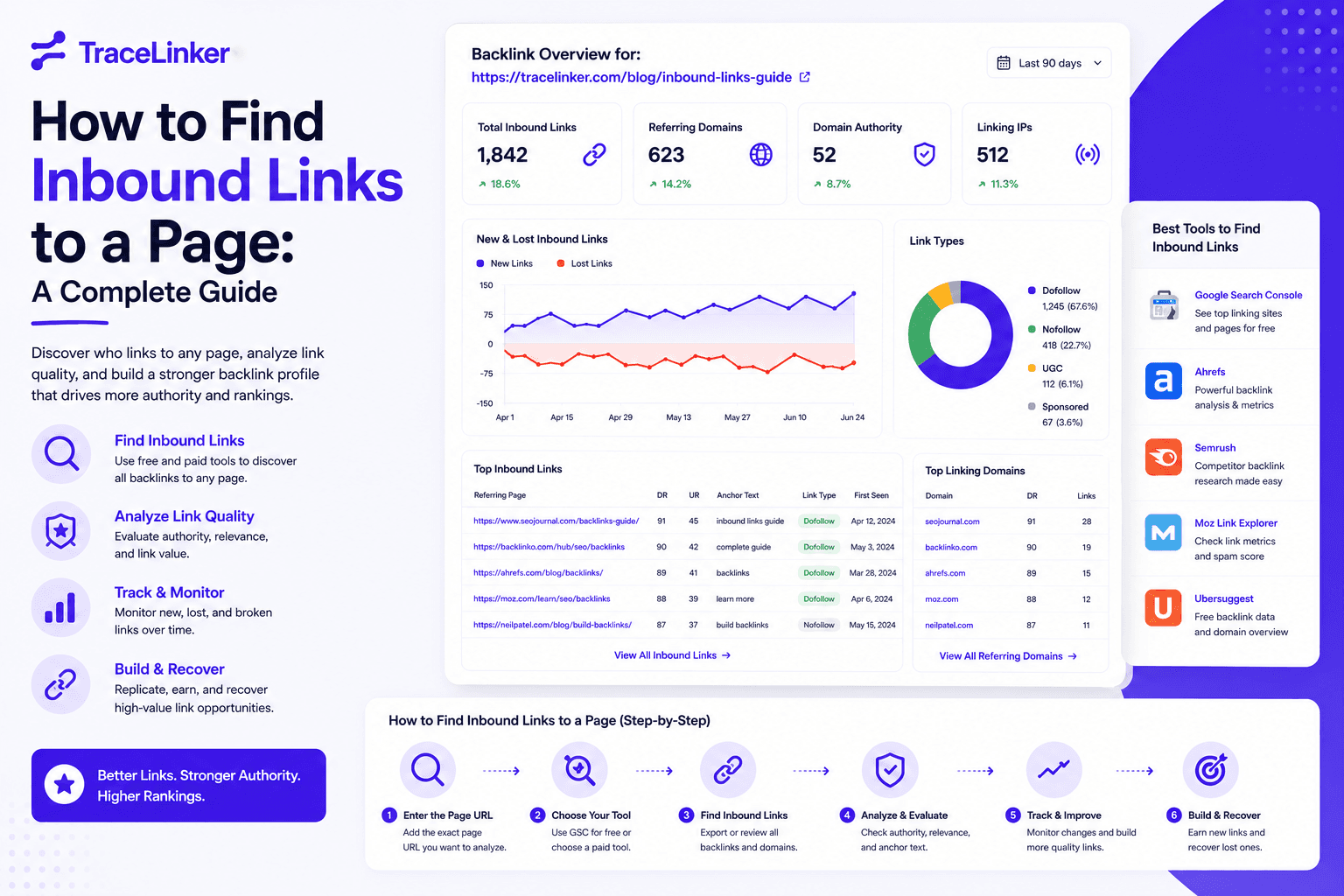


How to Find Inbound Links to a Page: A Complete Guide
Inbound links, also called backlinks, are one of the strongest signals of authority on the web. Whether you want to audit your own link profile, analyze a competitor, or recover lost link equity, you first need to know how to find inbound links to a page.
This guide covers the fastest free and paid methods, from Google Search Console to backlink checker tools, plus how to evaluate the links you find.
What are inbound links?
An inbound link is any hyperlink from another website that points to a page on your site. Search engines treat inbound links as votes of confidence. The more high-quality, relevant links a page has, the more likely it is to rank well.
Not all inbound links are equal. A single link from a trusted, relevant site can be worth more than hundreds of links from low-quality directories. That is why finding the links is only the first step; analyzing them is what drives decisions.
Why finding inbound links matters
Finding inbound links helps you:
- Audit link quality: spot toxic or spammy links before they hurt rankings.
- Track link growth: see which pages are gaining or losing backlinks over time.
- Find link opportunities: discover who links to competitors but not to you.
- Recover lost links: identify broken or removed links and reclaim them.
- Measure content performance: see which pages earn the most links.
Method 1: Google Search Console
Google Search Console is the most direct source for links Google knows about, and it is free.
- Open Google Search Console.
- Select the property you want to check.
- Go to Links in the left sidebar.
- Under External links, click More to see the full report.
- View Top linked pages to see which pages have the most inbound links.
- Click a specific page to see the sites linking to it.
GSC shows you the number of external links and linking domains, but it does not show anchor text in detail or quality scores. For deeper analysis, you will need a third-party tool.
Method 2: Google search operators
You can use Google’s search operators to find pages linking to a specific URL. This method is limited because Google does not show every link, but it is useful for quick checks.
link:example.com/page-url
Replace example.com/page-url with the page you want to check. Note that Google’s link: operator is deprecated and unreliable for a complete list. It is better used as a rough spot check than as a research method.
For internal links, use site: combined with the target URL:
site:example.com "target-page"
This helps you find internal pages linking to a specific page, which is useful for internal linking optimization.
Method 3: Backlink checker tools
Backlink checker tools crawl the web and maintain large indexes of links. They are the most reliable way to find inbound links to a page. Popular options include:
| Tool | Best for |
|---|---|
| Ahrefs | Largest backlink index, detailed reports |
| Moz Link Explorer | Spam score, Domain Authority, anchor text |
| Semrush | Backlink audits and competitor analysis |
| Majestic | Trust Flow and Citation Flow metrics |
| TraceLinker | Transparent link scoring and monitoring |
Most tools work the same way: enter the URL you want to analyze and view the list of referring domains and pages. You can usually filter by:
- Dofollow vs. nofollow
- Link type (text, image, redirect)
- Domain authority or rating
- Anchor text
- New vs. lost links
Method 4: Browser extensions
Browser extensions like Ahrefs SEO Toolbar and MozBar let you see backlink metrics while you browse. They are useful for quick checks when you are researching competitors or evaluating a specific site.
Method 5: Command-line checks
For technical users, you can use command-line tools to check for internal links to a page. For example, after crawling your site with a tool like Screaming Frog or a custom script, filter the destination URLs to find all pages linking to a specific target.
This is not a practical method for external backlinks, but it is powerful for internal link analysis.
How to analyze inbound links once you find them
Finding the links is only half the work. Use this checklist to evaluate each one:
| Factor | What to look for |
|---|---|
| Relevance | Is the linking site related to your topic or industry? |
| Authority | Does the linking domain have strong authority? |
| Anchor text | Is the anchor natural and descriptive? |
| Link type | Is it a followed editorial link or a nofollow/sponsored link? |
| Context | Is the link surrounded by useful content? |
| Traffic | Does the linking page receive organic traffic? |
| Stability | Is the link new, old, or recently lost? |
A healthy link profile has a mix of followed and nofollow links, varied anchor text, and links from relevant, authoritative domains.
How to find toxic inbound links
Not every inbound link is good. Some can hurt your site. Look for:
- Links from link farms or PBNs
- Domains with thin or duplicated content
- Unnatural exact-match anchor text
- Links from foreign-language sites unrelated to your niche
- Links in spam comments or forum signatures
- Sudden spikes in low-quality links
If you find toxic links, try to remove them first. For links you cannot remove, create a disavow file and submit it through Google Search Console. TraceLinker’s disavow file generator builds a Google-ready disavow.txt file from your list of harmful URLs and domains.
For more details on cleaning up harmful links, see our guide on how to reduce spam score.
How to find inbound links to a specific page with TraceLinker
TraceLinker offers a focused workflow for backlink discovery and analysis:
- Free backlink checker: enter any URL or domain and see inbound links with scoring and reasoning. Try the free backlink checker.
- CSV import: upload backlink exports from Ahrefs, Semrush, GSC, or other tools into the backlink CSV analyzer.
- Transparent scoring: each link receives a 1–100 score with a one-sentence rationale, so you understand why it is good or bad.
- Monitoring: set hourly, daily, or weekly re-crawls to detect new, lost, or changed links.
- Disavow export: generate a disavow file for toxic links in one click.
This is especially useful if you manage multiple clients or domains and need a fast, repeatable way to find and evaluate inbound links.
How to find competitor inbound links
Finding where competitors get their links is one of the best ways to discover opportunities for your own site.
- Enter a competitor’s domain or page into a backlink checker.
- Filter for followed links from relevant domains.
- Look for patterns: guest posts, directories, resource pages, podcasts, or partnerships.
- Identify sites that link to multiple competitors but not to you.
- Reach out with a relevant pitch or content asset.
This process is often called backlink gap analysis. It turns competitor research into a concrete link-building plan.
How to monitor inbound links over time
One-time checks are not enough. You need ongoing monitoring because:
- New links can appear from outreach, PR, or organic mentions.
- Old links can break or be removed without notice.
- Competitors can gain links that change the competitive balance.
Set up alerts or scheduled reports to track new and lost links. In TraceLinker, you can monitor individual backlinks with re-crawls and receive notifications when a link changes state.
Common mistakes when finding inbound links
- Relying on one tool: every backlink index misses some links. Cross-check with at least two sources.
- Ignoring internal links: internal links are inbound links too, and they help distribute authority.
- Focusing only on quantity: ten relevant, authoritative links beat a thousand low-quality ones.
- Not checking anchor text: over-optimized anchors can trigger penalties.
- Forgetting to act: finding links is useless if you do not use the data to build, reclaim, or disavow.
Final thoughts
Finding inbound links to a page is a foundational SEO skill. Whether you use Google Search Console, a paid backlink checker, or a specialized tool like TraceLinker, the goal is the same: understand who is linking to you, why, and whether those links help or hurt.
Once you have the data, turn it into action. Reclaim lost links, disavow toxic ones, and build new links from relevant, authoritative sites. If you want a faster, more transparent way to manage the process, sign up for TraceLinker and use the free backlink checker, anchor text analyzer, and backlink monitoring to stay on top of your inbound link profile.