
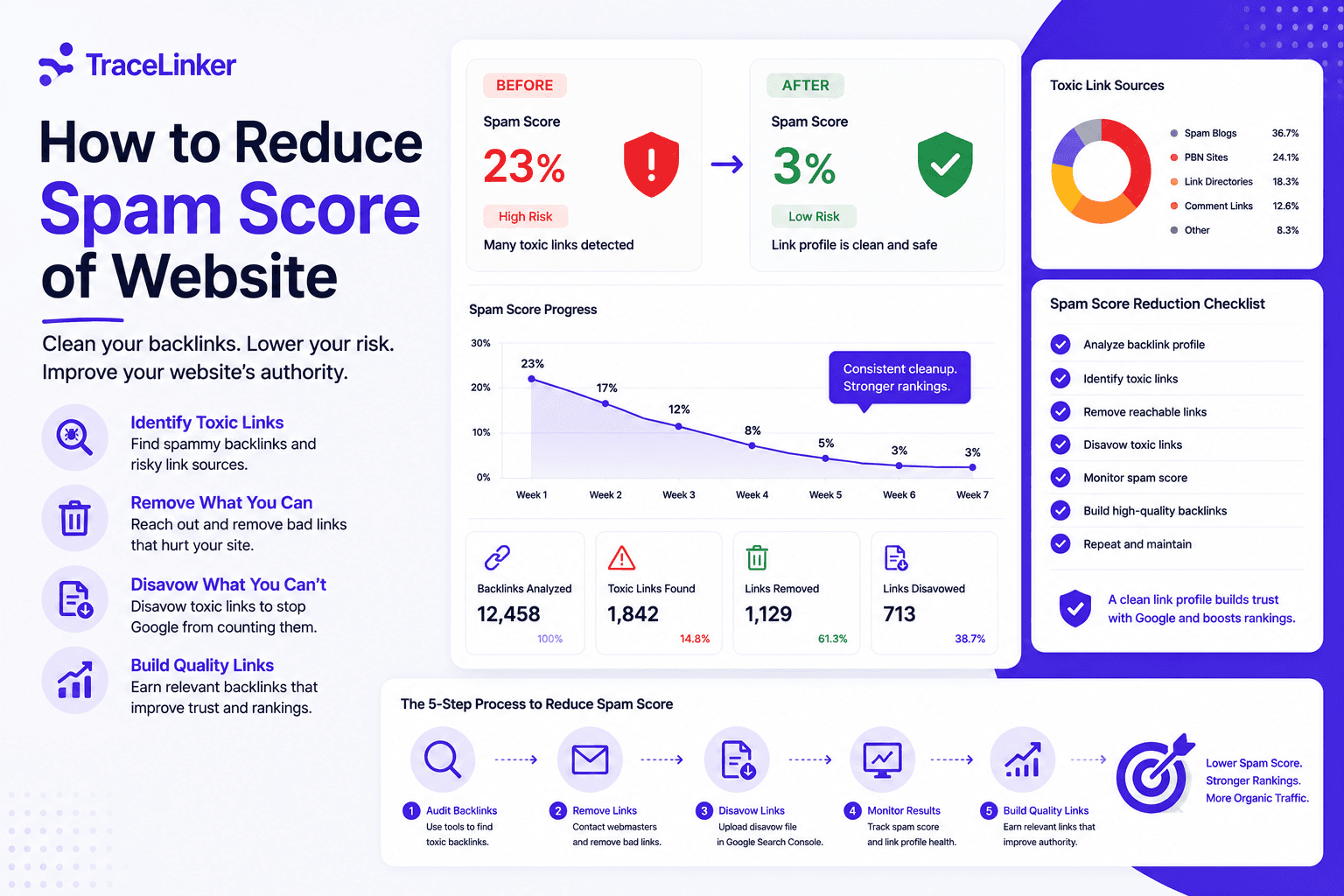


How to Reduce Spam Score of Website: A Practical Guide
A high spam score can make any website owner nervous. It is often the first warning sign that your backlink profile contains links Google would rather ignore. The good news is that spam score is fixable. The process is straightforward: identify the bad links, remove what you can, disavow what you cannot, and replace them with links that actually help.
This guide explains how to reduce spam score of website step by step, using free tools and a clear workflow that keeps your link profile clean.
What is spam score?
Spam score is a metric created by Moz. It predicts how likely a website is to be penalized based on patterns seen in sites that already received Google penalties. It is scored from 0 to 100, where higher numbers mean more risk.
| Score | Interpretation |
|---|---|
| 1–30% | Low risk |
| 31–60% | Medium risk |
| 61–100% | High risk |
It is important to remember that spam score is not a Google metric. Google does not use Moz spam score directly. However, the factors that push spam score up — spammy backlinks, link schemes, thin content, keyword stuffing — are exactly the things that can trigger a real Google penalty or algorithmic devaluation.
Why spam score matters
Even if Google does not look at Moz spam score, the metric is a useful early warning system. A rising spam score usually means:
- Your site has gained low-quality or artificial backlinks.
- A competitor is running a negative SEO campaign against you.
- Your link profile lacks diversity and looks unnatural.
- Old content or comments have attracted spam.
Ignoring it is risky. If the underlying issues are real, traffic can drop without warning. Fixing the problem before Google acts is much easier than recovering from a penalty.
What causes a high spam score?
Understanding the causes helps you prioritize the fix. Common triggers include:
- Toxic backlinks: links from PBNs, link farms, irrelevant directories, or spammy sites.
- Low link diversity: too many links from the same source or network.
- Unnatural anchor text: over-optimized or exact-match anchors.
- Keyword stuffing: excessive keyword use in content or meta tags.
- Thin content: pages with little useful content.
- Duplicate content: copied or near-duplicate pages.
- Spam user comments: unmoderated comments filled with links.
- Malware or hacked pages: injected links and malicious scripts.
- Keyword-rich, long domain names: domains that look artificially built for SEO.
How to reduce spam score of website: a step-by-step workflow
Step 1: Check your current spam score
Start with a free spam score checker. Moz Link Explorer is the most common source, but other SEO tools also provide similar risk scores. Record the score and the date so you can track progress.
Step 2: Export your backlink data
Use Google Search Console, Ahrefs, Semrush, or Moz to export all backlinks pointing to your site. The export should include at minimum:
- Source URL
- Target page on your site
- Anchor text
- Domain authority or quality score
If you have a CSV export from a third-party tool, upload it to TraceLinker’s backlink CSV analyzer. It will classify links, flag toxic patterns, and give you a clean starting point for the next steps.
Step 3: Identify toxic and suspicious links
Review the export for links that look artificial or harmful. Red flags include:
- Links from foreign-language sites unrelated to your niche.
- Domains with zero traffic or no real content.
- PBN patterns: same IP, same hosting, identical templates.
- Sitewide footer or sidebar links.
- Exact-match anchor text in high volume.
- Links from adult, gambling, or pharma sites.
- Links that appeared suddenly in large numbers.
TraceLinker scores each link 1–100 with transparent reasoning, which makes this step faster. You can also use the anchor text analyzer to spot over-optimized anchors before they become a penalty risk.
Step 4: Try to remove bad links manually
For links you control — such as old directory submissions, guest posts, or partner links — log in and remove them. For links you do not control, contact the site owner and request removal. Be polite and specific. Keep a record of your outreach attempts.
Most toxic links will not be removed this way, but it is worth trying for the most damaging ones.
Step 5: Create a disavow file
For links you cannot remove, use Google’s Disavow Links Tool. Create a plain text file with one URL or domain per line.
# Individual URLs to disavow
https://spammy-site.com/page-a/
https://spammy-site.com/page-b/

# Entire domains to disavow
domain:spammy-network.com
domain:cheap-links.xyz
If you are unsure about the format, use TraceLinker’s disavow file generator. It builds a Google-ready disavow.txt file from your list of toxic URLs and domains.
Step 6: Upload the disavow file to Google Search Console
Go to the Disavow Links Tool, select your property, and upload the file. Google will process it over the following days or weeks. The disavow file does not remove the link, but it tells Google to ignore it.
Step 7: Build high-quality backlinks
The most reliable way to lower spam score over time is to earn better links. Focus on:
- Creating original, useful content worth linking to.
- Guest posting on relevant, reputable sites.
- Building relationships in your industry.
- Reclaiming lost or broken links.
- Earning natural mentions from press and partners.
A few strong, relevant backlinks outweigh hundreds of low-quality ones. This is where diversity matters: links from different sources, using varied anchor text, signal a natural profile.
Step 8: Fix on-site issues
Backlinks are only part of the problem. Clean up the site itself:
- Remove or nofollow spam comments.
- Delete thin or duplicate pages.
- Fix keyword stuffing.
- Ensure HTTPS is enabled.
- Scan for malware and hacked pages.
- Make the site mobile-friendly.
For a full checklist, our web audit checklist covers the technical, content, and backlink review process.
Tools to monitor spam score and toxic links
| Tool | Purpose |
|---|---|
| Moz Link Explorer | Check spam score and backlink profile |
| Google Search Console | Monitor links, manual actions, and index issues |
| Google Analytics | Identify spam traffic and referral patterns |
| TraceLinker | Backlink scoring, toxic link detection, disavow export |
| Disavow Links Tool | Tell Google to ignore harmful links |
TraceLinker is designed specifically for backlink management. It imports links from GSC or CSV, scores each link with AI reasoning, monitors link state changes, and exports Google-ready disavow files. For a quick check, try the free backlink checker.
How long does it take to lower spam score?
Spam score does not drop overnight. After disavowing toxic links and removing on-site issues, you may see changes within a few weeks, but significant improvement usually takes one to three months. Moz updates its spam score as it recrawls the web, so the timeline depends on when it discovers your cleaned profile.
The more important timeline is Google’s. If your rankings were affected by a link-based algorithm filter, recovery may take until the next core update or until Google recrawls and re-evaluates your link graph.
Common mistakes when lowering spam score
- Disavowing everything: only disavow links you are confident are harmful. Disavowing good links can hurt rankings.
- Ignoring the source: spam score is often a symptom of how links were built. Stop the bad practice first.
- Buying “quick fixes”: services that promise instant spam score reduction are usually selling more spam links.
- Forgetting on-site issues: backlinks get the attention, but thin content and spam comments matter too.
- Not tracking progress: document your starting score, actions, and results so you know what works.
Prevention: keep spam score low
Once your spam score is under control, keep it that way with a few habits:
- Audit your backlink profile monthly.
- Set up alerts for new links from suspicious domains.
- Moderate all user comments and form submissions.
- Avoid link schemes, PBNs, and automated link building.
- Diversify your link sources and anchor text.
- Keep content original, useful, and well-structured.
If you are actively building links, use TraceLinker to monitor them. Its hourly, daily, or weekly re-crawls detect when a link changes state or disappears, and its toxic link detection flags patterns before they inflate your spam score.
Final thoughts
Spam score is a signal, not a sentence. A high number means you should look closer at your backlinks and site quality, not panic. The fix is methodical: audit, remove, disavow, improve, and monitor.
If you want a faster, more transparent way to manage toxic backlinks, sign up for TraceLinker and use the backlink CSV analyzer, disavow file generator, and backlink monitoring to keep your spam score low and your rankings safe.