
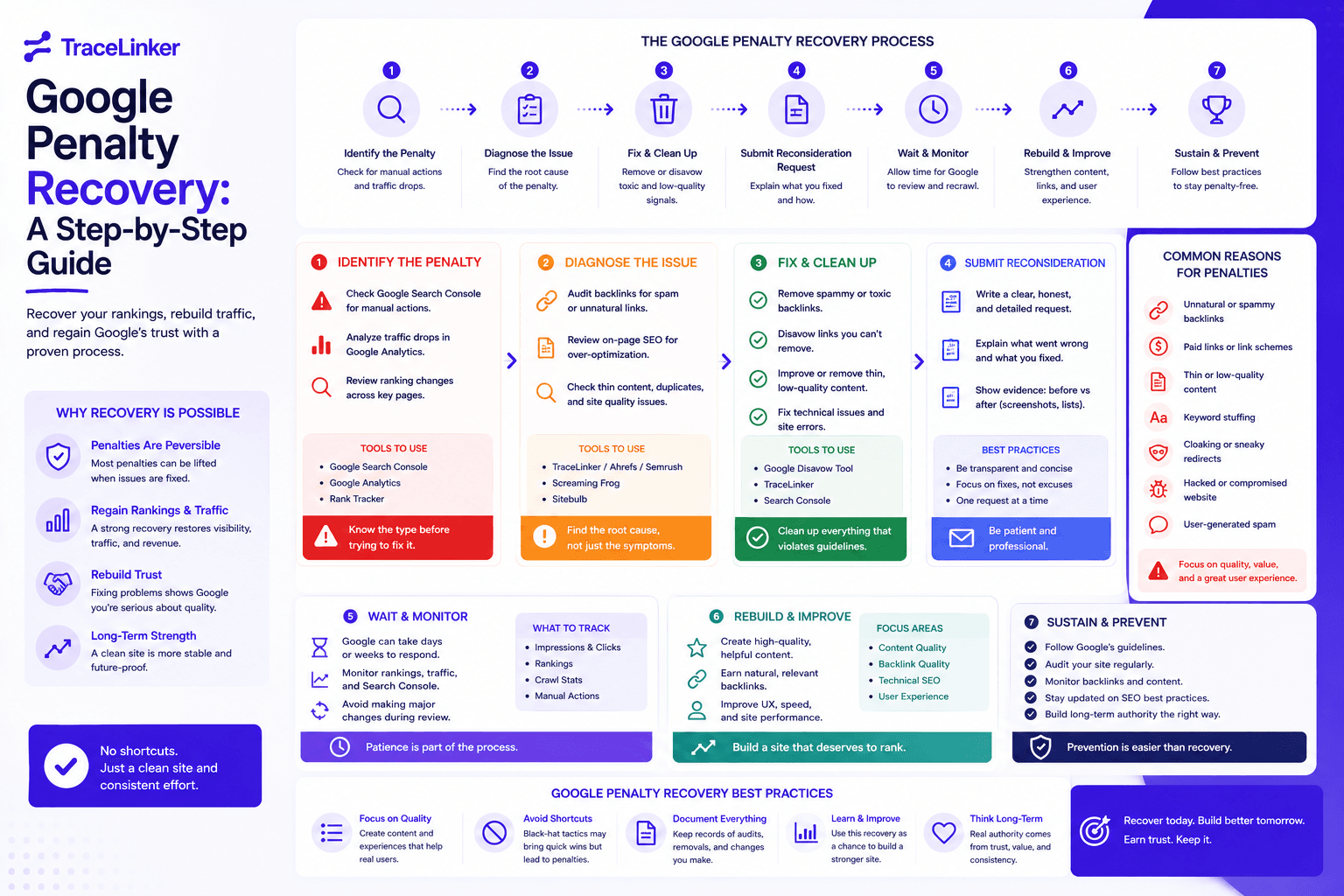


Google Penalty Recovery: A Step-by-Step Guide
A Google penalty can cause a sudden drop in traffic, rankings, and revenue. The good news is that most penalties can be recovered from if you follow a clear process. The bad news is that there is no magic button. Recovery requires diagnosis, cleanup, and patience.
This guide walks through a practical recovery process for website owners, SEOs, and agencies. It covers how to identify the type of penalty, what to fix, and how to rebuild trust with Google.
Step 1: confirm you actually have a penalty
Before you assume the worst, make sure the traffic drop is really a penalty and not something else. Common causes of traffic drops that look like penalties include:
- A seasonal traffic pattern
- A tracking code error
- A competitor outranking you
- A Google core update
- A broken site migration
- A technical issue such as a noindex tag or robots.txt block
Start by checking the date of the traffic drop. If it aligns with a confirmed Google algorithm update, you are likely dealing with an algorithmic impact rather than a manual penalty. If the drop is sudden and severe, check Google Search Console first.
Step 2: identify the type of penalty
There are two types of Google penalties: manual actions and algorithmic actions.
Manual actions
A manual action is issued by a human reviewer at Google. You will receive a message in Google Search Console under Security & Manual Actions > Manual actions. The message explains the issue and gives examples of the affected pages.
Common manual actions include:
- Unnatural links to your site
- Unnatural links from your site
- Thin content
- Cloaking or sneaky redirects
- Hidden text or keyword stuffing
- Hacked site
- Spammy structured markup
- User-generated spam
Manual actions are specific. The message tells you what Google found, which makes the recovery path clearer.
Algorithmic actions
An algorithmic action is not a manual penalty. It happens when Google’s algorithms, such as the core spam update or Penguin, evaluate your site as low quality or manipulative. You will not receive a message in Search Console. The only sign is a ranking or traffic drop that aligns with a known update.
Algorithmic penalties are harder to diagnose because they are broad. You need to evaluate the site against Google’s quality guidelines and compare your site to competitors that maintained or gained rankings.
Step 3: run a full diagnostic
Once you know the type of penalty, gather evidence before making changes.
Check Google Search Console
- Review the Manual actions report.
- Check the Links report for unusual backlink patterns.
- Review Coverage, Core Web Vitals, Experience, and Mobile Usability reports.
- Look at Search performance to see which queries and pages lost traffic.
Check Google Analytics
- Confirm the tracking code is working.
- Identify the exact date of the drop.
- Segment traffic by channel, device, and landing page.
- Look for drops in organic, direct, or referral traffic specifically.
Check recent changes
Talk to your team or client. Ask if any of the following happened in the three months before the drop:
- Site migration or redesign
- New link building campaign
- Bulk content changes
- Plugin or platform updates
- robots.txt or noindex changes
- URL structure changes
- Backlink purchase or exchange
Step 4: run a technical and content audit
Many penalties are caused by technical issues or low-quality content. A full audit will help you find them.
Technical audit checklist
- Is the site crawlable and indexable?
- Are there redirect chains, loops, or broken links?
- Is the canonical tag correct?
- Is HTTPS enforced?
- Are there mobile usability issues?
- Are Core Web Vitals within acceptable ranges?
- Is the XML sitemap accurate and submitted?
- Are there duplicate content issues?
Use our web audit checklist for a structured review.
Content audit checklist
- Is the content original, useful, and well-sourced?
- Are there thin or duplicate pages?
- Is there keyword stuffing or hidden text?
- Are affiliate pages marked clearly?
- Are user-generated sections moderated?
- Is the E-E-A-T of the site clear?
Step 5: clean up your backlink profile
Backlink-related penalties are the most common type of manual action. The recovery process has three parts.
1. Find the bad links
Start with Google Search Console’s Links report. Export the list of external links. Then cross-reference with data from other tools if you have them. Look for:
- Links from sites with no traffic or relevance
- Links from PBNs or link farms
- Over-optimized anchor text
- Links from foreign-language sites unrelated to your niche
- Links in spammy directories or blog comments
- A sudden spike in backlinks that you did not earn
You can import CSV exports from Ahrefs, Semrush, or Moz into TraceLinker’s backlink CSV analyzer to score link quality consistently. The analyzer flags toxic patterns and gives each link a clear health rating.
2. Request removal
For each bad link, try to contact the site owner and ask for removal. Keep a record of every email you send. Google wants to see that you made a genuine effort before using the disavow tool.
3. Disavow the rest
For links that cannot be removed, create a disavow file and submit it through Google’s Disavow Links Tool. The file format is simple: one URL or domain per line, with domain: in front of domains you want to disavow entirely.
Use TraceLinker’s disavow file generator to produce a Google-ready disavow.txt. For the full process, read our guide on how to disavow backlinks.
You can also use the anchor text analyzer to check whether over-optimized anchors contributed to the penalty.
Step 6: fix on-page issues
If the penalty is content-related, fix the underlying quality issues before submitting a reconsideration request. Common fixes include:
- Removing or improving thin content pages
- Merging duplicate pages into one strong page
- Adding author bios, citations, and original data
- Removing keyword stuffing and hidden text
- Fixing misleading structured data
- Adding clear affiliate or sponsored disclosures
- Improving page experience and mobile usability
Do not just delete pages. If a page has backlinks or traffic, improve it. If it has no value, redirect it to a relevant page or remove it with a proper 404.
Step 7: submit a reconsideration request (manual actions only)
For manual actions, you can submit a reconsideration request once you have fixed the issues. There is no form for algorithmic penalties; you must wait for the next algorithm update or refresh.
A good reconsideration request should:
- Acknowledge the issue
- Explain what caused it
- Describe every action you took to fix it
- Include evidence, such as removal request emails and disavow file dates
- Commit to following Google’s guidelines in the future
Be honest and specific. Generic requests that say “we fixed everything” are usually rejected. Show that you understand the violation and have taken concrete steps.
Step 8: wait and monitor
After submitting a reconsideration request, Google may take a few days to a few weeks to respond. You will receive a message in Search Console when the review is complete. If the request is rejected, the message will tell you what still needs to be fixed.
For algorithmic penalties, there is no notification. Monitor your rankings and traffic over the next few months. Recovery often happens after a core update that re-evaluates your site.
Typical timelines
- Manual action review: 10 to 30 days
- Algorithmic recovery: 3 to 12 months, depending on the severity
Step 9: prevent future penalties
Recovery is not the end. You need to put processes in place to avoid future penalties.
- Monitor your backlink profile regularly
- Avoid link schemes and paid links
- Audit content quality before publishing at scale
- Keep plugins, themes, and platforms updated
- Use strong security to prevent hacking
- Train your team on Google’s guidelines
- Review your site after every major update
TraceLinker’s ongoing monitoring can help by alerting you to new toxic backlinks, lost links, and changes in your backlink profile. You can also schedule regular exports using the free backlink checker to keep an eye on new links.
How TraceLinker helps with Google penalty recovery
TraceLinker is built around backlink auditing and cleanup, which is the core of many penalty recovery cases. You can use it to:
- Import backlink CSVs and score links with AI reasoning
- Detect toxic links, PBNs, and spam patterns
- Generate a Google-ready disavow.txt file
- Monitor your backlink profile for new risks
- Track lost and gained links over time
- Export client-ready PDF or CSV reports
While TraceLinker does not fix content or technical penalties directly, it gives you a clear view of the link-related issues that often cause manual actions. Pair it with a technical audit and content review for a complete recovery plan.
Google penalty recovery checklist
- Confirm the traffic drop is a penalty, not a tracking issue or seasonality
- Check Google Search Console for manual actions and messages
- Identify the penalty type: manual or algorithmic
- Correlate the drop with a known Google update
- Run a technical SEO audit
- Run a content quality audit
- Audit your backlink profile for toxic links
- Request removal of bad links
- Create and submit a disavow file for remaining bad links
- Fix on-page issues such as thin content, hidden text, and markup
- Submit a reconsideration request for manual actions
- Monitor rankings and traffic after fixes
- Put processes in place to prevent future penalties
Final thoughts
Google penalty recovery is hard work, but it is possible. The key is to diagnose the problem correctly, fix the root cause, and show Google that you are committed to quality. Whether the issue is backlinks, content, or technical SEO, the process is the same: understand the violation, clean it up, and rebuild trust.
If you are dealing with a backlink-related penalty, start with a backlink audit. Use the backlink CSV analyzer to score your links, then build your disavow file with the disavow file generator. For more background on link quality, read our article on what is spam score.