
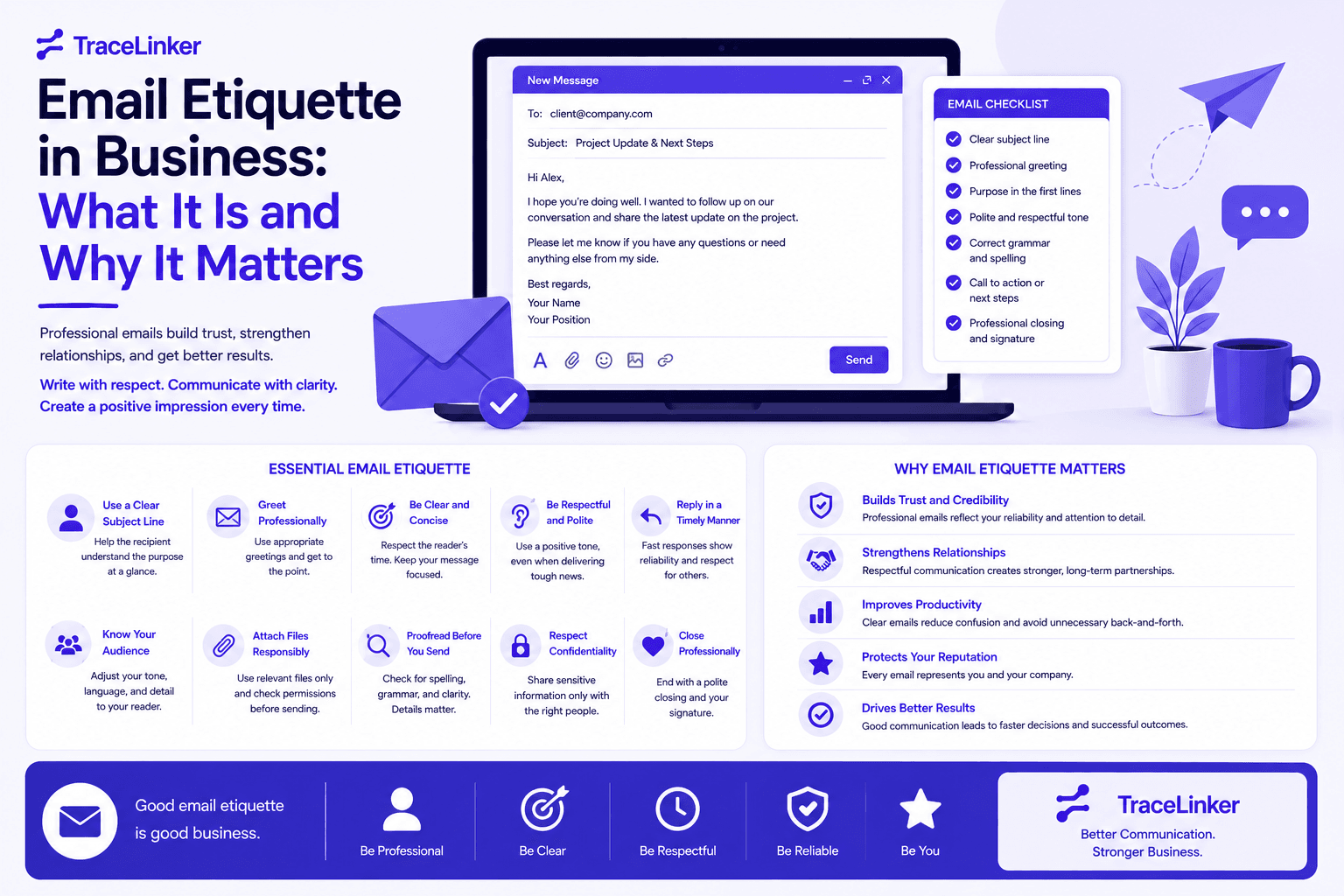


Email Etiquette in Business: What It Is and Why It Matters
Email is still the backbone of business communication. It is fast, trackable, and easy to scale. But it is also permanent. Once you hit send, the message exists outside your control, and a poorly written email can damage a relationship before it even starts.
Email etiquette in business is the set of unwritten rules that keep professional email communication clear, respectful, and effective. It matters whether you are writing to a colleague, a client, a journalist, or a site owner you want a backlink from. In this guide, we explain what business email etiquette is, why it matters, and how to apply it to SEO outreach and link building.
What Is Email Etiquette in Business?
Email etiquette is the code of conduct that guides how people write and respond to emails in a professional setting. It covers everything from subject lines and greetings to tone, formatting, response times, and sign-offs.
The goal of email etiquette is simple: make communication efficient, respectful, and easy to understand. A well-written email shows attention to detail, builds trust, and reduces the chance of misinterpretation. A poorly written email can create confusion, seem unprofessional, or even offend the recipient.
Business email etiquette is not about being overly formal. It is about matching the tone and structure of your email to the situation and the recipient. An email to a close colleague can be brief and casual. An email to a journalist or potential link partner should be polished, specific, and respectful of their time.
Why Email Etiquette Matters for SEO and Link Building Teams
For SEO teams, email is not just an internal tool. It is a core part of outreach, link building, and reputation management. The way you write an outreach email directly affects whether a site owner will:
- Open your message.
- Read past the first sentence.
- Take your request seriously.
- Respond positively or ignore you completely.
A single outreach email can be the difference between earning a high-quality backlink and being marked as spam. Good email etiquette makes your outreach more credible, more personal, and more likely to succeed.
This is especially true for cold outreach, where you are contacting someone who does not know you. In these situations, your email is your first impression. If it is unclear, pushy, or unprofessional, the recipient has no reason to trust you. If it is concise, relevant, and respectful, you are far more likely to get a response.
The Core Principles of Business Email Etiquette
Most email etiquette rules come back to a few core principles. Understanding these principles helps you adapt your writing to any situation, whether you are emailing a coworker or pitching a guest post.
Be Clear and Concise
Busy professionals skim their inboxes. Your email should communicate its purpose quickly. Avoid long introductions, unnecessary details, and vague language. If you can say something in ten words, try saying it in five.
A clear email has a specific subject line, a short introduction, a focused body, and a clear next step. The recipient should know exactly what you want within the first few seconds of reading.
Be Respectful of Time
Every email you send is a request for someone’s attention. Respect that by getting to the point, avoiding fluff, and making it easy to respond. If your email requires action, say so clearly. If no response is needed, say that too.
This is especially important in outreach. Site owners and journalists receive dozens of pitches every day. An email that wastes their time will be deleted quickly. An email that respects their time by being relevant and specific stands out.
Match the Tone to the Relationship
Email etiquette is not one-size-fits-all. A formal greeting like "Dear Ms. Johnson" may be appropriate for a first contact, but it can feel stiff for a colleague you work with daily. Similarly, "Hey" might be fine internally but can seem unprofessional to a new contact.
When in doubt, start slightly more formal and adjust based on the recipient’s response. For SEO outreach, a professional but friendly tone usually works best.
Proofread Before Sending
Spelling mistakes, grammar errors, broken links, and missing attachments all hurt your credibility. A proofread email shows that you care about the details and respect the recipient enough to send something polished.
This is particularly important for link-building outreach. A pitch with a broken link or a misspelled name signals carelessness, which makes the recipient less likely to trust your content or your site.
How to Write a Professional Business Email
A professional business email has a clear structure. Following this structure makes your emails easier to read and more likely to get the response you want.
Subject Line
The subject line is the first thing the recipient sees, and it often determines whether the email gets opened. A good subject line is:
- Clear and specific.
- Concise, ideally under 50 characters or six to ten words.
- Honest about the contents of the email.
- Free of spammy words like "URGENT," "FREE," or excessive punctuation.
Examples of good subject lines for business outreach:
- "Quick question about your article on local SEO"
- "Resource suggestion for your link-building guide"
- "Follow-up: guest post pitch for [Site Name]"
Avoid vague subject lines like "Hi," "Touching base," or "FYI." These do not tell the recipient why the email matters.
Salutation
Start with a professional greeting. Good options include:
- "Hello [First Name]"
- "Hi [First Name]"
- "Good morning [First Name]"
- "Dear [First Name]"
- "Dear [Title] [Last Name]"
Use the recipient’s preferred name. If their email signature says "Jennifer," do not assume they go by "Jen." For SEO outreach, "Hello [First Name]" is usually safe and professional.
Introduction
If the recipient does not know you, introduce yourself briefly. State your name, your company, and why you are writing. For example:
My name is Alex, and I lead content at TraceLinker. I came across your article on backlink audits and wanted to share a resource that might be useful for your readers.
This introduction is short, relevant, and gives the recipient context for the rest of the email.
Body
The body should be focused on one purpose. Do not combine multiple unrelated requests. Use short paragraphs and bullet points where appropriate. If you are asking for something, make the ask clear and specific.
For outreach emails, the body should:
- Show that you have read the recipient’s content.
- Explain why your request is relevant to them or their audience.
- Make the value exchange clear.
Closing
End with a polite closing that matches the tone of the email. Common options include:
- "Best"
- "Best regards"
- "Sincerely"
- "Thank you"
- "Thanks"
Include a professional signature with your name, title, company, and website. This makes it easy for the recipient to verify who you are.
Email Etiquette for SEO Outreach and Link Building
Link building outreach has its own email etiquette challenges. You are often contacting strangers, asking for something valuable, and competing with many other pitches. Here are the rules that matter most.
Personalize Every Email
Generic templates are easy to spot and easy to ignore. Take the time to mention the recipient’s name, reference a specific article, and explain why your content fits their site. A personalized email shows respect and increases response rates.
Our guide on guest blogging outreach covers how to research prospects and write personalized pitches that get replies.
Lead With Value, Not a Demand
No one owes you a backlink. Approach outreach as a value exchange. Explain what the recipient gains by linking to your content, whether it is a better resource for their readers, original data, or a useful tool.
For example, instead of saying "Please link to my article," say:
I noticed your guide to local SEO citations could benefit from an updated example. I recently published a case study with fresh data that might fit well in your resources section.
Be Specific About the Ask
Vague requests are harder to act on. If you want a link, say exactly where you think it fits. If you are pitching a guest post, propose a specific topic. The easier you make it for the recipient to say yes, the better your results.
Follow Up Politely
A single email is often not enough. Many responses come after a follow-up. However, follow-ups must be polite and spaced appropriately. A common cadence is:
- Initial email.
- Follow-up after three to five business days.
- Final follow-up after another week.
If you still get no response, move on. Sending too many follow-ups can feel aggressive and damage your reputation. A good rule of thumb is the three-email rule: initial email, one follow-up, and one final attempt.
Avoid Mass Blasts
Sending hundreds of identical emails may seem efficient, but it usually backfires. Recipients can tell when an email is automated, and many will mark it as spam. Even if you use a tool to scale outreach, each email should feel like it was written for one person.
Use a Professional Email Address
Send outreach from a professional domain email address, not a personal Gmail or Yahoo account. An email from "[email protected]" looks more credible than "[email protected]." This is especially important for first-contact outreach.
Common Business Email Etiquette Mistakes
Even experienced professionals make email etiquette mistakes. Here are the most common ones to avoid.
Using All Caps or Excessive Punctuation
All caps reads as shouting. Multiple exclamation points seem unprofessional or insincere. Keep your formatting simple and let your words carry the emphasis.
Overusing Formatting
Bold, italics, and underline can help emphasize a point, but overusing them makes the email hard to read. Use one form of emphasis at a time and only when necessary.
Including Humor or Sarcasm
Humor and sarcasm do not translate well in text. Without tone or body language, a joke can easily be misinterpreted. Keep business emails professional and positive.
Using Emojis
Emojis may be fine in some internal communications, but they are generally unprofessional in business outreach. They can also trigger spam filters or make your email seem immature.
Hitting Reply All
Only use Reply All when everyone on the thread genuinely needs the information. Replying to a large group with a single sentence wastes everyone’s time and clutters inboxes.
Forgetting Attachments
If you mention an attachment, include it. If you paste information into the email body instead, say so. Double-check before sending to avoid the awkward follow-up "Here is the file I forgot to attach."
Writing the Recipient’s Email First
A simple but effective habit is to write the email body first and add the recipient’s address last. This prevents accidental sends before you have finished writing and proofreading.
Email Etiquette for Follow-Ups
Follow-up emails are a normal part of business communication, but they require careful etiquette. A good follow-up is polite, brief, and adds context without being pushy.
Follow Up Within a Reasonable Timeframe
For most business emails, replying within 24 hours is considered courteous. If you are waiting for a response, follow up after three to five business days. For time-sensitive outreach, you can follow up sooner, but always explain why.
Add Value, Not Pressure
Instead of saying "Just checking if you saw my email," try adding something useful. For example:
I wanted to follow up on my email about the backlink gap analysis guide. I also noticed you recently published an article on local SEO, and I think the data in our study could be a strong fit there too.
This approach shows you are paying attention and gives the recipient a reason to respond.
Know When to Stop
If you have sent two or three follow-ups and received no response, it is usually best to move on. Continuing to email someone who is not interested can harm your sender reputation and waste your time. Focus your energy on prospects who show engagement.
How TraceLinker Helps You Maintain Outreach Email Etiquette
TraceLinker includes AI-drafted outreach and reclaim emails designed to sound professional, personalized, and respectful. The platform helps you apply good email etiquette at scale without losing the human touch.
- Pre-extracted contact data: TraceLinker finds relevant contact information for your prospects, so you can address them correctly and avoid sending emails to the wrong person.
- AI-drafted templates: The AI generates outreach emails that are clear, concise, and value-focused, following best practices for professional business communication.
- Personalized pitches: Instead of generic templates, TraceLinker suggests wording based on the specific link opportunity, making each email feel tailored.
- Reclaim and follow-up workflows: The platform helps you track which prospects need a follow-up and when, so you stay polite and persistent without becoming pushy.
- Backlink monitoring: After a link is placed, TraceLinker monitors the page and alerts you if the link changes or disappears, so your follow-up emails are always timely and relevant.
Good email etiquette is a skill, but it is also a system. With the right tools, you can make sure every outreach email reflects your brand well. Start by exploring our guest blogging outreach guide, then learn how to build a full link building strategy around respectful, value-driven outreach.
Conclusion
Email etiquette in business is about more than avoiding mistakes. It is about communicating clearly, respecting the recipient’s time, and building trust with every message you send. For SEO teams, this directly impacts the success of outreach, link building, and relationship development.
The best business emails are clear, concise, personalized, and professional. They have strong subject lines, respectful greetings, focused bodies, and clear next steps. They avoid all caps, excessive formatting, humor, and vague requests. And they follow up politely without becoming a nuisance.
If you want to improve your outreach results, start by applying these email etiquette principles to every pitch. Then use TraceLinker to scale the process while keeping each email personal and professional.
Related Resources
- Guest Blogging Outreach
- Link Building Strategy
- Get Website Backlinks
- Backlink Gap Analysis
- Find Inbound Links to a Page
- Find Broken Links on a Website
- Free Backlink Checker
- Backlink CSV Analyzer
- Anchor Text Analyzer
- Disavow File Generator
- Do Follow Backlinks
- Google Search Console Backlink Checker
- Google Penalty Recovery