
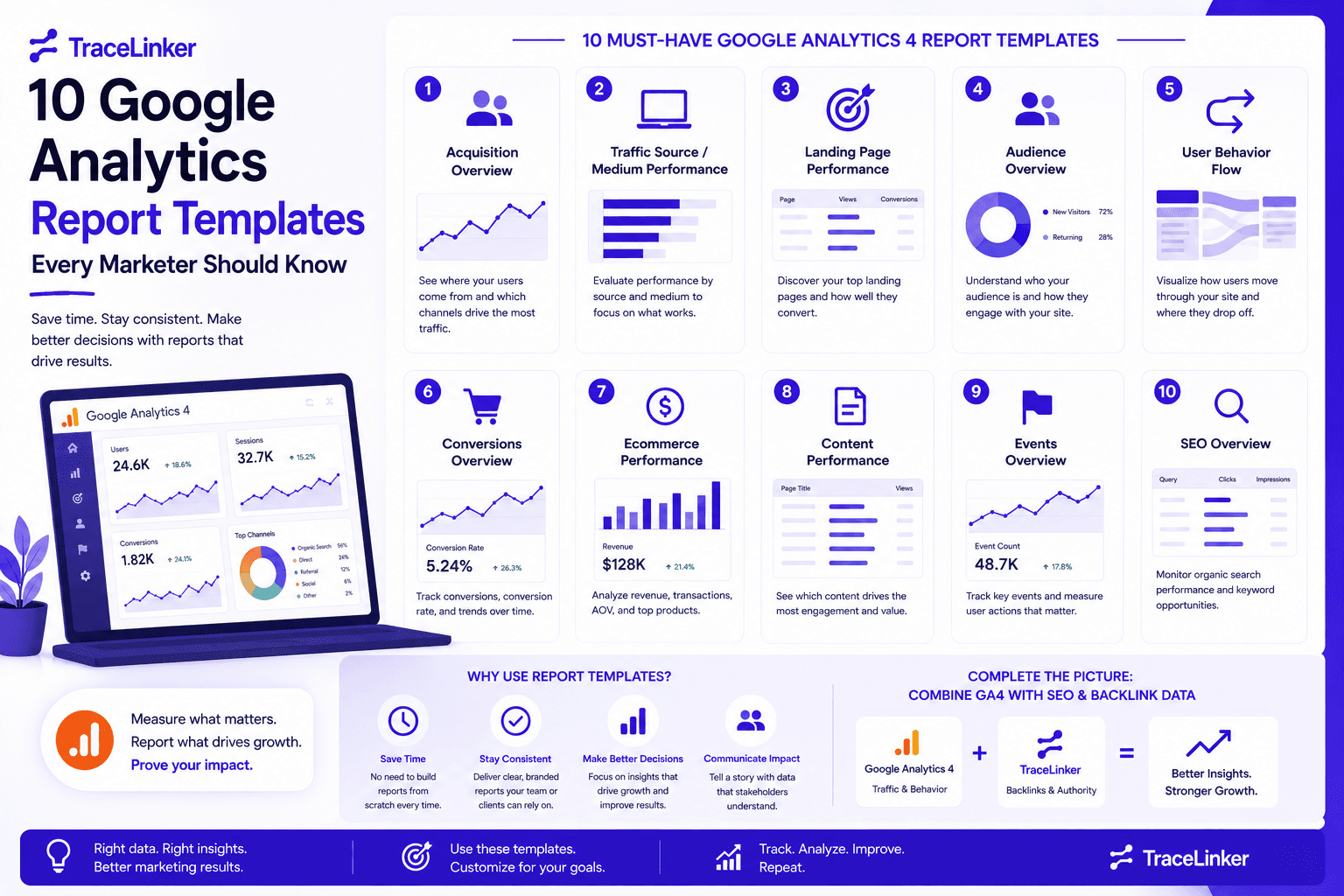


10 Google Analytics Report Templates Every Marketer Should Know
Google Analytics 4 gives marketers a powerful way to track website traffic, user behavior, and conversions. But raw data alone does not drive decisions. The real value comes from organizing that data into clear, repeatable reports that answer the questions stakeholders actually care about.
A Google Analytics report template saves time, keeps reporting consistent, and makes it easier to compare results over time. Whether you are reporting to a client, a manager, or your own team, the right template turns complex data into a readable story.
In this list, we cover ten useful Google Analytics report templates for GA4. We also explain how to combine them with backlink and SEO data for a more complete picture of your organic performance.
1. GA4 Overview Report Template
The GA4 overview report is the starting point for most analytics reviews. It surfaces the high-level metrics that show whether your site is growing or declining.
What it includes:
- Total users and new users
- Sessions and session duration
- Engagement rate and bounce rate
- Key events and conversions
- Revenue, if ecommerce is enabled
Best used for: Weekly executive check-ins, quick performance snapshots, and board-level summaries. It answers the question, "How is the site doing overall?"
Most GA4 properties come with a built-in overview report, but you can customize it by creating a detail report and saving it as a template. This lets you remove metrics that do not matter to your business and highlight the ones that do.
2. Traffic Acquisition Report Template
Traffic acquisition reports show where your visitors come from. This is essential for understanding which channels drive the most valuable traffic.
What it includes:
- Sessions by channel (organic search, direct, referral, paid, social, email)
- New users by channel
- Key events by channel
- Revenue attributed to each channel
Best used for: Channel strategy, budget allocation, and identifying shifts in traffic sources. For example, a sudden drop in organic search traffic may signal an algorithm update or a technical SEO issue.
When paired with backlink data, the acquisition report becomes even more useful. A spike in referral traffic from a new domain can be traced to a recent backlink placement. TraceLinker's monitoring helps you confirm which links are still live and which ones may have disappeared.
3. Landing Page Performance Report Template
Landing page reports show which pages are attracting traffic and how those visitors behave once they arrive.
What it includes:
- Sessions by landing page
- Engagement rate per page
- Conversions by page
- Average engagement time
- Exits and bounce behavior
Best used for: Content optimization, identifying high-potential pages, and spotting pages that underperform. If a page has high traffic but low conversions, the issue may be messaging, layout, or call-to-action clarity.
For SEO teams, this template is especially useful when combined with backlink data. Pages with strong backlinks but low traffic may have indexing or cannibalization issues. Our guide on find inbound links to a page shows how to verify which backlinks point to each landing page.
4. Ecommerce Report Template
Ecommerce reports are critical for online stores. They connect marketing activity to actual revenue and help identify what is driving sales.
What it includes:
- Total revenue and purchases
- Revenue by product
- Revenue by traffic source
- Average purchase value
- Checkout and cart abandonment metrics
Best used for: Conversion rate optimization, product performance analysis, and attribution modeling. If you run paid and organic campaigns, ecommerce reports show which channels are actually generating revenue.
Coupler.io and other automation platforms offer GA4 ecommerce templates for Shopify and other platforms. These templates pull data automatically and refresh on a schedule, so you always have the latest numbers without manual exports.
5. Audience Demographics Report Template
Demographics reports help you understand who is visiting your site. This information shapes content strategy, targeting, and product development.
What it includes:
- Age and gender breakdowns
- Language and location
- Interests and device usage
- New vs. returning users by segment
Best used for: Persona validation, localization strategy, and content planning. If a significant portion of your audience comes from mobile devices, your mobile experience becomes a priority.
This template works well alongside backlink analysis. If your highest-converting audience segment is located in a specific country, you can look for backlink opportunities from publishers in that region.
6. Events and Conversions Report Template
Events and conversions reports show how users interact with your site beyond pageviews. In GA4, almost everything is an event, so this template helps you track what matters most.
What it includes:
- Top events by event count
- Key events marked as conversions
- Conversion rate by page or channel
- Event parameters and values
Best used for: Measuring micro-conversions, tracking content engagement, and validating marketing funnels. For example, you can track downloads, video plays, form starts, and button clicks as events.
A clean events report template makes it easier to share results with stakeholders who do not live inside GA4 every day. It also helps you spot tracking issues early if expected events are missing.
7. SEO Traffic Report Template
The SEO traffic report focuses specifically on organic search performance. It pulls the metrics that matter most to SEO teams and clients.
What it includes:
- Organic sessions and users
- Organic landing pages
- Organic key events and conversions
- Branded vs. non-branded traffic
- Keyword and query data from Google Search Console integration
Best used for: Monthly SEO reviews, content performance analysis, and justifying SEO investment. This template pairs naturally with Google Search Console data.
You can learn how to check the backlinks that support your organic traffic in our guide on how to use Google Search Console as a backlink checker. For a deeper backlink audit, TraceLinker's free backlink checker and backlink CSV analyzer help you connect link data with traffic trends.
8. Referral Traffic and Backlink Correlation Report Template
Referral traffic reports show visits that come from other websites. When combined with backlink data, this template helps you measure the real impact of your link-building efforts.
What it includes:
- Referral sessions by source
- New users from referral sources
- Key events and conversions from referrals
- Backlinks from the same referring domains
Best used for: Measuring whether backlinks are driving traffic, not just authority. A high-authority backlink that sends no traffic may still help SEO, but a backlink that sends qualified visitors is often more valuable.
To build this template, export your backlink data from Google Search Console or a third-party tool and combine it with your GA4 referral traffic export. TraceLinker can help you analyze the CSV, classify links, and identify which referring domains are worth monitoring. Learn more in our backlink CSV analyzer.
9. Monthly SEO Report Template
The monthly SEO report is the standard deliverable for agencies and in-house SEO teams. It combines traffic, engagement, and conversion data into a single document.
What it includes:
- Month-over-month organic traffic
- Top landing pages
- Keyword rankings and visibility
- Backlink acquisition and lost links
- Technical SEO highlights
- Goals and next steps
Best used for: Client reporting, internal team reviews, and performance tracking over time. A good monthly SEO report template tells a story: what happened, why it happened, and what comes next.
For agencies, TraceLinker's white-label PDF reports and shareable links make it easier to deliver professional backlink reports without starting from scratch. You can also automate parts of this workflow. Our guide on automate SEO reporting explains how to reduce manual report preparation.
10. Executive Summary Dashboard Template
The executive summary dashboard is designed for stakeholders who want answers, not spreadsheets. It distills the most important metrics into a clean, visual format.
What it includes:
- Total traffic and trend
- Top channels
- Key conversions and revenue
- Top pages
- Backlink and authority highlights
Best used for: C-suite presentations, client calls, and quarterly business reviews. The goal is to communicate performance in under five minutes.
Tools like Looker Studio, Power BI, and Tableau can pull GA4 data into a live dashboard. You can also include backlink metrics from TraceLinker to show how off-page SEO contributes to overall performance. For a complete view, combine this dashboard with your SEO analytics dashboard setup.
How to Build Your Own GA4 Report Template
Creating a custom report template in GA4 is straightforward. Here is the general process:
- Identify the question. Decide what the report needs to answer. Traffic sources? Content performance? Revenue attribution?
- Choose the metrics and dimensions. Select the GA4 dimensions and metrics that answer the question. Avoid adding too many; focus on the numbers that drive decisions.
- Create a detail report. In GA4, go to the Reports section, click "Create new report," and choose "Create detail report." You can start from a template or a blank report.
- Customize the layout. Add cards, tables, and charts that make the data easy to read. Use filters to remove noise.
- Save and share. Save the report as a template, export it as a PDF, or schedule email delivery to stakeholders.
For teams that want to go further, platforms like Coupler.io and Semrush My Reports automate the data pull and refresh, so your reports stay current without manual work.
Connecting Google Analytics Reports with Backlink Data
Google Analytics shows what happens on your site. Backlink data shows why some of that traffic is happening. Combining the two gives you a much clearer picture of organic performance.
For example:
- A landing page gains organic traffic after earning a high-quality backlink.
- Referral traffic spikes from a site that recently linked to you.
- A content page with many backlinks has low engagement, suggesting the content does not match user intent.
TraceLinker makes this combination easier. You can import backlink data from Google Search Console or CSV exports, score each link with AI, and monitor changes over time. This helps you explain traffic changes in your reports and prioritize link-building activities that actually move the needle.
When to Use a Google Analytics Report Template
Templates are useful whenever you need consistent, repeatable reporting. Use them for:
- Weekly team standups: quick overview dashboards.
- Monthly client reviews: detailed SEO and performance reports.
- Campaign analysis: traffic acquisition and conversion reports tied to specific campaigns.
- Quarterly strategy: executive summaries with long-term trends.
- Troubleshooting: landing page, referral, and event reports that help identify issues.
The key is to match the template to the audience. Executives need summaries. Analysts need detail. Clients need context and next steps.
Free Tools That Complement Your GA4 Reports
Google Analytics report templates are only one part of a complete reporting workflow. These TraceLinker tools can help you add backlink and SEO context to your reports:
For client reporting, you may also want to explore our guides on client SEO report and automate SEO reporting.
Conclusion
A Google Analytics report template is more than a formatted spreadsheet. It is a decision-making tool that helps you turn data into action. The ten templates in this list cover the most common reporting needs for marketers, from high-level overviews to ecommerce deep dives and SEO-specific reports.
For SEO teams, the real power comes from combining GA4 data with backlink insights. When you can explain not just how much traffic you earned but also which links contributed to it, your reports become more persuasive and more useful.
Start with the templates that fit your current workflow, then layer in backlink data from TraceLinker to build reports that cover the full customer journey, from discovery to conversion.