
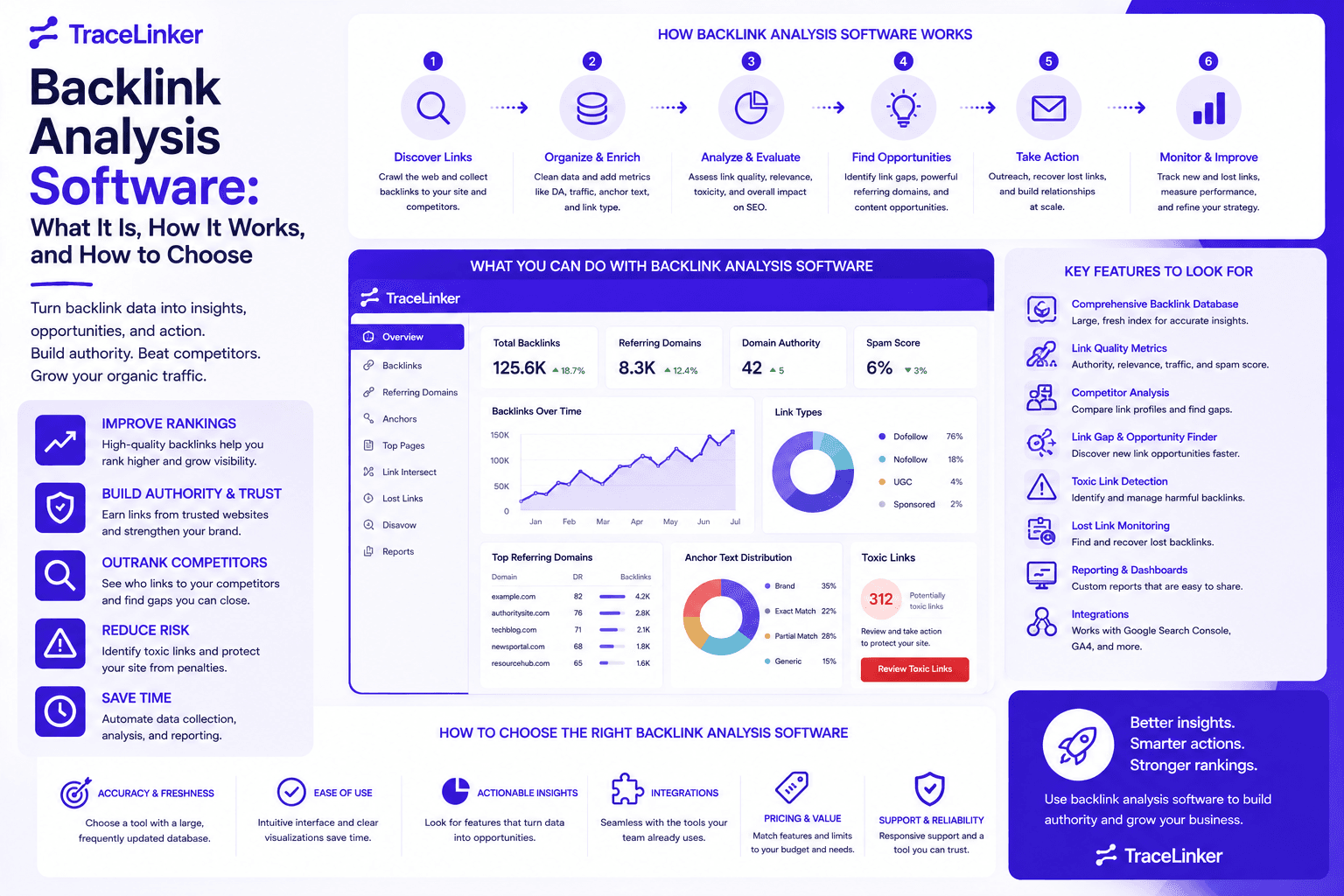


Backlink Analysis Software: What It Is, How It Works, and How to Choose
Backlinks remain one of the strongest signals search engines use to judge authority and relevance. But a raw list of links is rarely useful. You need context: which links help, which ones hurt, which competitors are outpacing you, and where the next opportunity lies. That is where backlink analysis software comes in.
At TraceLinker, we help SEO teams turn backlink data into clear action plans. In this guide, we explain what backlink analysis software is, how it works, what features to look for, and how to choose the right tool for your needs.
What Is Backlink Analysis Software?
Backlink analysis software is a tool that collects, organizes, and interprets the links pointing to a website. It goes far beyond counting backlinks. A good platform shows the quality of each link, the authority of the referring domain, the anchor text used, and whether the link is followed or nofollowed. It also tracks changes over time, such as new links gained, valuable links lost, and suspicious links that could trigger a penalty.
These tools are used by in-house SEOs, agencies, and content marketers to:
- Audit their own backlink profile and identify risks
- Benchmark competitors and find link-building opportunities
- Track the results of outreach and digital PR campaigns
- Prepare disavow files for Google Search Console
- Report progress to clients and stakeholders
Without backlink analysis software, you are left guessing which links move the needle and which ones put your site at risk.
Why Backlink Analysis Matters
Search engines treat links as votes of confidence. A high-quality backlink from a trusted, relevant site can improve rankings and drive referral traffic. A low-quality or manipulative link can do the opposite, especially if it comes from a link scheme, private blog network, or spam directory.
Backlink analysis helps you answer questions like:
- How many unique domains link to my site?
- Are my most important pages earning links?
- Which links pass authority and which are nofollowed?
- Are there toxic links I should disavow?
- How does my link profile compare to competitors?
A clear understanding of your backlink profile lets you focus your efforts on links that actually matter. You can start by running a quick audit with TraceLinker’s free backlink checker to see a snapshot of your profile.
Core Features of Backlink Analysis Software
Most backlink analysis tools share a common set of features. The difference usually lies in data freshness, index size, ease of use, and how actionable the insights are.
Link Discovery and Index Size
The foundation of any backlink tool is its crawler. The tool continuously discovers pages on the web and records the links it finds. A larger index means more links are captured, but size alone does not guarantee accuracy. The tool must also update frequently, remove dead links, and avoid duplicate records.
Authority and Trust Metrics
Backlink analysis software typically assigns an authority score to each referring domain and page. Common metrics include Domain Rating, Domain Authority, Authority Score, and Trust Score. These scores are proprietary calculations based on link quantity, quality, traffic, and other signals. They are useful for quick comparisons, but they should be used alongside your own judgment.
Referring Domains and Backlinks
A backlink is a single link from one page to another. A referring domain is the unique website that contains those links. One domain can link to you hundreds of times. SEOs usually care more about the number of unique referring domains than the total number of backlinks, because search engines weight domain diversity heavily.
Anchor Text Analysis
Anchor text is the clickable text of a link. It provides context to search engines about the destination page. Backlink analysis tools show the distribution of anchor text across your profile, helping you spot over-optimized exact-match anchors that could look manipulative. Use TraceLinker’s anchor text analyzer to review your own anchor distribution.
Dofollow vs. Nofollow Breakdown
By default, a link passes authority unless a rel attribute changes it. A dofollow link passes link equity, while a nofollow link is generally treated as a hint and may not pass authority. Backlink analysis software shows the ratio of dofollow to nofollow links so you can judge how much equity your profile is receiving. Learn more about how this distinction works in our guide to do follow backlinks.
New and Lost Links
Tracking new and lost links over time is essential. A sudden spike in backlinks might indicate a viral campaign or a negative SEO attack. A drop in links can explain a ranking decline. Most tools visualize this data so you can act quickly.
Toxic Link Detection
Not all links are good. Some come from spam networks, low-quality directories, or hacked sites. Backlink analysis software flags suspicious links based on patterns like low authority, unnatural anchor text, or contextual irrelevance. Once flagged, you can add them to a disavow file. If you suspect toxicity, use TraceLinker’s disavow file generator to create a Google-ready disavow.txt.
Competitor Gap Analysis
You can analyze any domain you do not own, including competitors. Backlink analysis tools show where competitors get their links, which pages attract the most links, and what anchor text they use. This is one of the fastest ways to find link-building opportunities. Our guide to backlink gap analysis walks through this process in detail.
Broken Link Detection
Backlinks can break when a page moves, is deleted, or changes its URL. A broken backlink still counts as a lost link unless it is redirected. Some tools identify broken links so you can reclaim them with a 301 redirect or outreach. See our guide on how to find broken links on a website.
Reporting and Exports
SEO teams need to share findings. Backlink analysis software usually supports CSV, PDF, and scheduled reports. White-label reporting is especially valuable for agencies.
How Backlink Analysis Software Works
Most backlink tools operate in three stages: crawling, indexing, and scoring.
Crawling
The provider runs a web crawler, similar to Googlebot, that continuously visits pages and records outbound links. The crawler respects robots.txt and crawl rate limits. A more active crawler discovers links faster but also costs more to operate.
Indexing
Discovered links are stored in a database. The index is cleaned to remove duplicates, dead links, and low-quality noise. The index is refreshed regularly, though update frequency varies between providers. Freshness matters for SEO because link profiles change constantly.
Scoring and Classification
The tool applies algorithms to score each link and domain. It may also classify links by type, platform, follow status, and location. Some platforms use machine learning to detect patterns associated with spam, private blog networks, and paid link schemes. At TraceLinker, we use AI to score every link on a 1–100 scale with transparent reasoning and specific action items, so you are not left interpreting opaque metrics alone.
What to Look for When Choosing Backlink Analysis Software
Choosing the right tool depends on your budget, team size, and workflow. Here are the factors that matter most.
Data Accuracy and Freshness
A backlink tool is only as good as its data. Look for a tool that updates frequently, covers your target markets, and avoids stale or inflated link counts. If you work in a niche language or region, verify that the tool indexes sites in that area.
Actionable Insights
Some tools dump raw data and expect you to figure it out. Others highlight what matters: toxic links, lost links, competitor opportunities, and outreach targets. If you are managing many domains, prioritize tools that turn data into tasks.
Integration with Your Workflow
The best tools import data from Google Search Console and CSV exports from Ahrefs, Semrush, Moz, and other sources. This lets you combine data sets and avoid switching between tabs. TraceLinker accepts both Google Search Console OAuth imports and CSV uploads for unified analysis.
Ease of Use
A clean interface and clear reports save time. Look for filtering, bulk exports, and visualizations that help you explain results to clients or stakeholders.
Pricing and Scale
Enterprise suites can be expensive. If you only need backlink analysis, a focused tool can deliver better value. Entry-level pricing, transparent credit systems, and free trials help you test before committing.
Toxic Link and Disavow Support
If you manage sites with history of negative SEO or manual penalties, toxic link detection and one-click disavow exports are essential. Our guide on how to disavow backlinks explains the full process.
Free vs. Paid Backlink Analysis Tools
Free tools are useful for quick checks and small audits. They often limit the number of results, domains, or exports. Paid tools provide deeper data, historical trends, competitor analysis, and reporting features.
For freelancers and small teams, a focused backlink tool can be more practical than a full SEO suite. TraceLinker offers free tools like the backlink checker, CSV analyzer, and anchor text analyzer so you can analyze links without a subscription.
Common Mistakes When Using Backlink Analysis Software
- Chasing total backlink count. Quality and relevance matter more than raw numbers.
- Ignoring lost links. Recovering a lost authoritative link is often easier than earning a new one.
- Over-relying on a single authority score. Use multiple signals, including relevance, traffic, and anchor text.
- Forgetting nofollow links. They still drive traffic and brand visibility.
- Failing to act on toxic links. Discovery without action leaves the risk in place.
- Not tracking competitors. Backlink analysis is not only about your own site.
How TraceLinker Approaches Backlink Analysis
TraceLinker is built specifically for backlink management. Instead of treating backlinks as a single report in a larger suite, we center the entire workflow around them.
- AI scoring: Every link receives a transparent 1–100 score with a rationale and action items.
- Unified imports: Pull data from Google Search Console or CSV exports from Ahrefs, Semrush, and others.
- Toxic link detection: Identify PBNs, spam, and suspicious patterns, then export a disavow file.
- Monitoring and alerts: Track when links change, go dead, or switch from dofollow to nofollow.
- Competitor gap analysis: Compare competitor profiles and generate outreach pitches.
- Outreach automation: AI drafts emails with pre-extracted contact data to turn opportunities into placements.
- Reporting: Export CSV and PDF reports, including white-label options for agencies.
If you are evaluating backlink analysis software, start with a free audit using TraceLinker’s free backlink checker, then dig deeper with the backlink CSV analyzer.
Conclusion
Backlink analysis software turns raw link data into a clear SEO strategy. It helps you understand link quality, track competitors, spot toxic links, and measure the impact of your outreach. The right tool will give you accurate data, actionable insights, and a workflow that fits your team.
Whether you choose an all-in-one SEO suite or a dedicated backlink platform, the goal is the same: build a healthy, relevant, and authoritative link profile. TraceLinker gives you the tools to audit, monitor, and act on your backlinks in one place.